

Use format:
1. Sites > choose the Duplicated template > click the three dots > edits
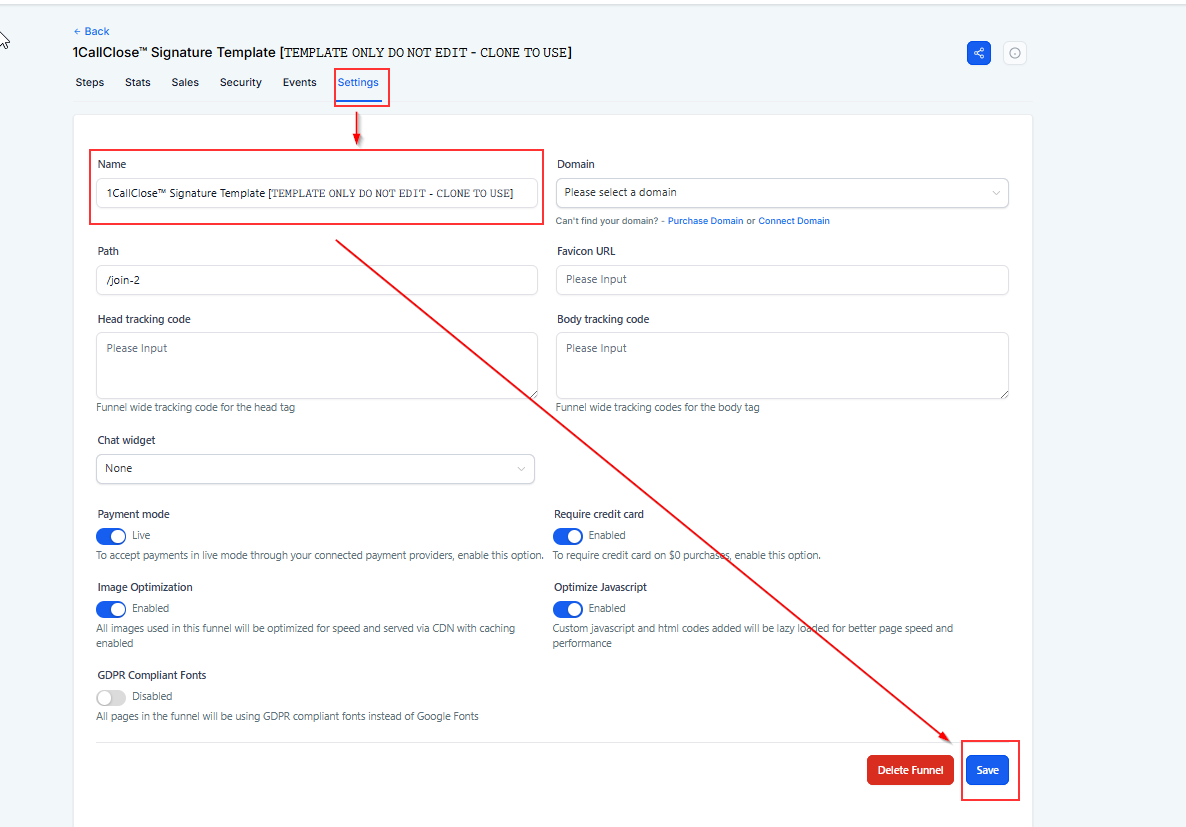
2. Settings >Change the name > then Save.
1CC - LP - [Offer Name] - [Version]
Example: 1CC - LP - Strategy Call - v1
✅ Reason: Prevent publishing the wrong page.
Frequently Asked Questions
Why is renaming the page non-negotiable?
Because it prevents you from accidentally editing or publishing the wrong page (especially when you have multiple clones).What’s the correct naming format to use?
Use: 1CC - LP - [Offer Name] - [Version]
Example: 1CC - LP - Strategy Call - v1Where do I rename the page inside Intellia?
Go to Sites → find the duplicated page → click ⋮ (three dots) → Edit → Settings → change the name → Save.I renamed it in the editor, but it still shows the old name in the list. Why?
It may not have saved properly. Click Save, refresh the page list, and check again. If still unchanged, try renaming from the page list settings instead of inside the editor.Should I rename the original template too?
No. Never rename or edit anything that says [TEMPLATE ONLY DO NOT EDIT]. Only rename your cloned version.What should I put as the “Version”?
Use simple versions like v1, v2, or include a date if needed (e.g., v1-Jan2026) so you can track changes over time.